We Created a Viral AI Celebrity Selfie Video with My Football-Mad 8-Year-Old
ON THIS PAGE
Subscribe To Get Weekly Family AI Discoveries

My 8-year-old son is obsessed with football. His bedroom walls are covered with posters of Mbappe, Messi, and the current young stars tearing up European leagues.
When he saw the viral "AI celebrity selfie" trend on social media, videos of people appearing to take selfies with celebrities on film sets, he had one request: "Dad, can we make one with me and all the footballers?"
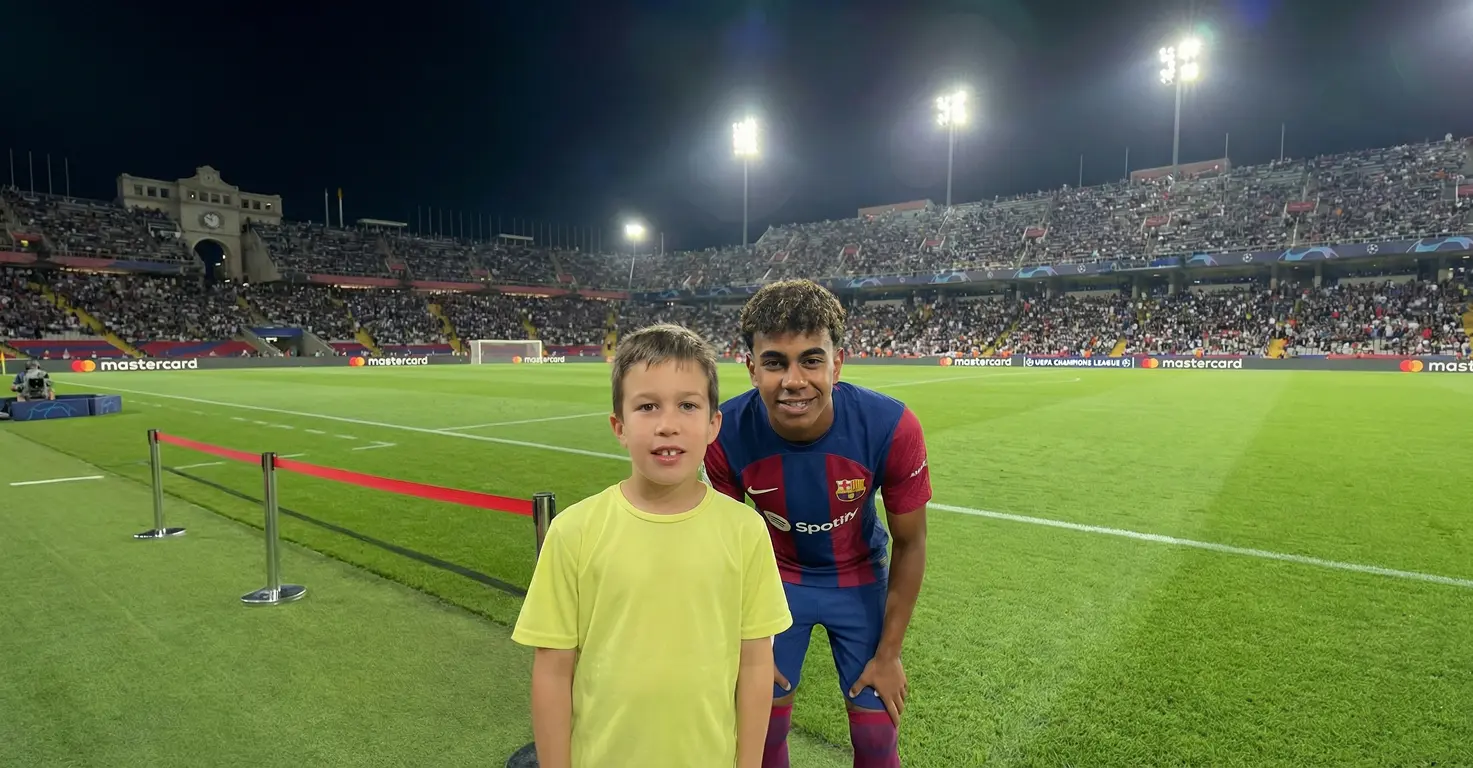
Using Nano Banana for AI image generation and Kling 3.0 for video (both available through Higgsfield), we created a 30-second clip showing him "meeting" Lamine Yamal, Kylian Mbappe, Bukayo Saka, Messi, and Ronaldo on what looks like professional behind-the-scenes film sets.
Here's exactly how we did it, including the prompts that worked, the ones that failed, and the workflow that got us to a finished video in under two hours.
Quick overview
- Time: 1-2 hours for first video
- Cost: Higgsfield subscription ($9-17/month) or free tier with limited credits
- Difficulty: Intermediate (prompts require iteration)
- Age range: 8-14 years with parent help
- Key learning: Detailed prompts with specific scene descriptions produce the best results
- What you'll create: 15-30 second viral-style video of your child with their heroes
What you'll need
Tools
- Higgsfield AI account ($9-17/month, limited free tier available)
- Nano Banana model (accessed through Higgsfield, less censored than other platforms)
- Kling 3.0 Turbo model (for image-to-video conversion)
- Video editing software (CapCut, iMovie, or similar for final assembly)
Your Child's Input
- List of celebrities they want to "meet" (5-8 works well)
- A clear, high-quality reference photo of your child
- Ideas for locations/scenarios (film sets, stadiums, behind-the-scenes)
Parent Skills
- Writing detailed AI prompts (you'll improve with practice)
- Basic video editing (trimming and sequencing clips)
- Patience for 2-3 iterations per image
Optional
- ChatGPT for generating improved prompts if initial attempts fail
- Trending audio from TikTok/Instagram for final video
Not sure which tool is right for your child?
Take our free 2-minute quiz and get personalized AI tool recommendations based on your child's age and interests.
Step-by-step process
Step 1: Create your celebrity list
Start by having your child list every celebrity they want in the video. For my son's football theme, we chose:
- Lamine Yamal (Barcelona's young sensation)
- Kylian Mbappe (Real Madrid)
- Bukayo Saka (Arsenal)
- Lionel Messi
- Cristiano Ronaldo
💡 Pro Tip: Five to eight celebrities is the sweet spot. Fewer feels underwhelming, more becomes tedious to generate.
Step 2: Prepare your reference photo
The AI needs a clear reference photo of your child to maintain their likeness across all generated images.
What works best:
- Well-lit face, looking at camera
- Neutral background
- Highest resolution possible
- Similar angle to how they'd appear in a selfie
We used a photo of my son in his favourite football jersey. The jersey helped the AI understand the context for the football-themed scenes.
Step 3: Generate celebrity images with Nano Banana
Open Higgsfield and select Nano Banana as your model. This is critical because Nano Banana through Higgsfield is less censored than other platforms and handles celebrity likenesses better.
Base prompt template:
Create a realistic, high-fidelity (8K) image based on the attached reference photo. Maintain the exact facial features, skin tone, bone structure, hairstyle, and expression of the attached person, with no alteration or face swapping. The attached person is taking a selfie with [CELEBRITY NAME], standing at [SET/LOCATION]. Crew members are adjusting internal lighting and equipment, with cables and gear visible. Directors and managers are standing behind, discussing the next take.
Our actual prompt for Mbappe:
Create a hyper-realistic image of the attached person based strictly on the reference photo. Maintain the exact facial features, skin tone, bone structure, hairstyle, and expression with no alteration or face swapping. Ultra-high fidelity, photorealistic, 8K quality. The attached person is standing inside a packed professional football stadium. The pitch is visible under bright floodlights. Kylian Mbappe is standing beside the attached person, clearly recognizable, wearing a professional football kit.
Result: First attempt produced a recognizable Mbappe in a stadium setting. My son's likeness was about 85% accurate. Second generation with slightly adjusted prompt improved it to near-perfect.
💡 Pro Tip: Generate each image 2-3 times and pick the best result. AI output varies, so you'll want options.
Step 4: Repeat for all celebrities
Work through your celebrity list, adjusting the prompt for each one. For variety, we changed locations:
- Mbappe: Inside stadium with floodlights
- Messi: Training ground setting
- Ronaldo: Behind-the-scenes film set with cameras visible
- Lamine Yamal: Stadium tunnel with "Camp Nou" styling
- Bukayo Saka: Emirates Stadium feel
Total time for 5 images: About 45 minutes including prompt refinement.
Step 5: Create the video transitions with Kling 3.0
This is where the magic happens. Still in Higgsfield, switch to Kling 3.0 Turbo for image-to-video conversion.
Use the First Frame / Last Frame feature:
- Upload your first celebrity image as the First Frame
- Upload your second celebrity image as the Last Frame
- Add a transition prompt
Video prompt template:
In the first frame, the person takes a picture with [CELEBRITY 1]. He then runs toward another set, as seen in the final frame. He meets [CELEBRITY 2] and takes a picture with them. A handheld camera follows him throughout the entire sequence.
Our actual prompt:
In the first frame, the person takes a picture with Kylian Mbappe. He then runs toward another location, as seen in the final frame. He meets Lionel Messi and takes a picture with him. A handheld camera follows him throughout the entire sequence.
Result: A smooth 3-4 second clip showing the transition between celebrities. The "handheld camera" instruction gives it that authentic, documentary feel.
Step 6: Chain your clips together
For each subsequent transition:
- Use the previous Last Frame as your new First Frame
- Upload the next celebrity image as the new Last Frame
- Generate the transition video
This creates a seamless loop where your child appears to run from celebrity to celebrity.
Step 7: Final editing and assembly
Import all your video clips into editing software (we used CapCut on iPad, which my son could help with).
Editing steps:
- Arrange clips in sequence
- Speed ramp for energy (we did 1.5x on the running portions)
- Add trending audio (search "celebrity selfie" on TikTok for popular tracks)
- Export as single continuous video
Final result: A 28-second video that looks like behind-the-scenes footage of my son meeting his football heroes. He watched it approximately 47 times.
What worked
Detailed scene descriptions
Vague prompts like "selfie with Messi" produced generic, obviously-AI images. Adding specific details about lighting, crew members, cables, and equipment made the results look like authentic behind-the-scenes footage.
Lesson: Spend time on your prompts. The more specific the scene description, the more convincing the result.
Using Nano Banana through Higgsfield
Other AI platforms either refused to generate celebrity likenesses or produced heavily censored results. Nano Banana on Higgsfield handled the requests without issues and produced recognizable celebrities.
Lesson: Platform choice matters significantly for this specific project type.
The First Frame/Last Frame technique
This was the breakthrough for video creation. Rather than trying to generate the whole video from scratch, using actual images as anchor points gave Kling 3.0 clear instructions for what to create.
Lesson: Break complex video projects into image-to-video segments rather than text-to-video.
Involving my son in the process
He chose the celebrities, picked his favourite generated images, and helped with final editing in CapCut. His investment in the project made the result infinitely more exciting for him.
Lesson: Make it collaborative, not a parent performance.
What didn't work
Generic prompts
Our first attempts used simple prompts like "photo of boy with Mbappe." The results looked obviously fake with weird lighting, inconsistent styling, and my son's face barely resembling his reference photo.
Time wasted: About 20 minutes and 6 generations before we refined our approach.
Lesson: Copy the detailed prompt templates and customize them. Don't try to simplify.
Trying other AI platforms first
We initially tried several free AI image generators. Most either refused celebrity requests outright or produced results where the celebrity was unrecognizable. Some platforms flagged and blocked our prompts entirely.
Time wasted: 30 minutes testing alternatives before settling on Higgsfield/Nano Banana.
Lesson: Start with Higgsfield for this specific project. The subscription cost is worth avoiding the frustration.
Low-quality reference photo
Our first reference photo was slightly blurry and taken in dim lighting. The AI struggled to maintain my son's likeness across generations, producing inconsistent results.
Time wasted: Had to regenerate several images after switching to a better reference photo.
Lesson: Invest 5 minutes in getting a great reference photo before starting. It saves significant time later.
Getting the most out of AI celebrity selfie videos
Before you start:
- Have your celebrity list ready with specific location ideas for each
- Take 3-4 reference photos and pick the clearest one
- Set expectations with your child: this takes patience, not instant results
During the process:
- Generate 2-3 variations of each image and let your child pick their favourite
- Save successful prompts in a notes app for future reference
- Take breaks between celebrities to prevent prompt fatigue
What I'd do differently:
- Start with the easier celebrities first (well-known faces the AI recognizes easily)
- Plan the video sequence before generating images so locations flow logically
- Test one complete image-to-video transition before generating all celebrity images
Platform comparison
Higgsfield AI ($9-17/month)
- Pros: Less censored, handles celebrity likenesses well, includes both image and video models
- Cons: Subscription required for serious use, learning curve for interface
- Best for: This specific project type where celebrity likeness matters
ChatGPT Images 2.0 (Free tier available)
- Pros: Great for refining prompts, helpful for troubleshooting
- Cons: Heavily restricted on celebrity content, won't generate recognizable faces
- Best for: Prompt writing assistance, not the actual image generation
We chose Higgsfield because it was the only platform that consistently produced usable results for celebrity selfie content. The monthly cost was justified by actually being able to complete the project.
Common issues and solutions
Problem: Celebrity is unrecognizable
Solution: Add more specific details to your prompt. Include what they're wearing (e.g., "wearing a professional Real Madrid kit"), their distinctive features, and the setting where you'd expect to find them. Younger or less famous celebrities may be harder for AI to recognize.
Problem: Child's face doesn't match reference photo
Solution: Try a higher quality reference photo. Ensure the lighting in your reference is similar to the scene you're generating. Add explicit instructions: "Maintain the exact facial features, skin tone, and bone structure of the attached person with zero alteration."
Problem: Video transitions look choppy
Solution: Ensure your First Frame and Last Frame have similar lighting and style. The AI creates smoother transitions when the start and end points share visual consistency. Try regenerating with a more specific motion prompt.
Problem: Prompt gets blocked or refused
Solution: Use the enhanced prompt template from Step 6 of the process (the longer ChatGPT-refined version). Frame it as a "behind-the-scenes film set" scenario rather than implying the celebrity interaction is real. This helps bypass content filters.
Problem: Credits running out too quickly
Solution: Plan your celebrity list and prompts before generating. Do test generations with only 1-2 celebrities first to refine your approach before committing credits to the full set. Consider the paid tier if you're doing multiple projects.