We Ran an AI Quiz in the Car and the Kids Caught It Making Things Up
ON THIS PAGE
Subscribe To Get Weekly Family AI Discoveries

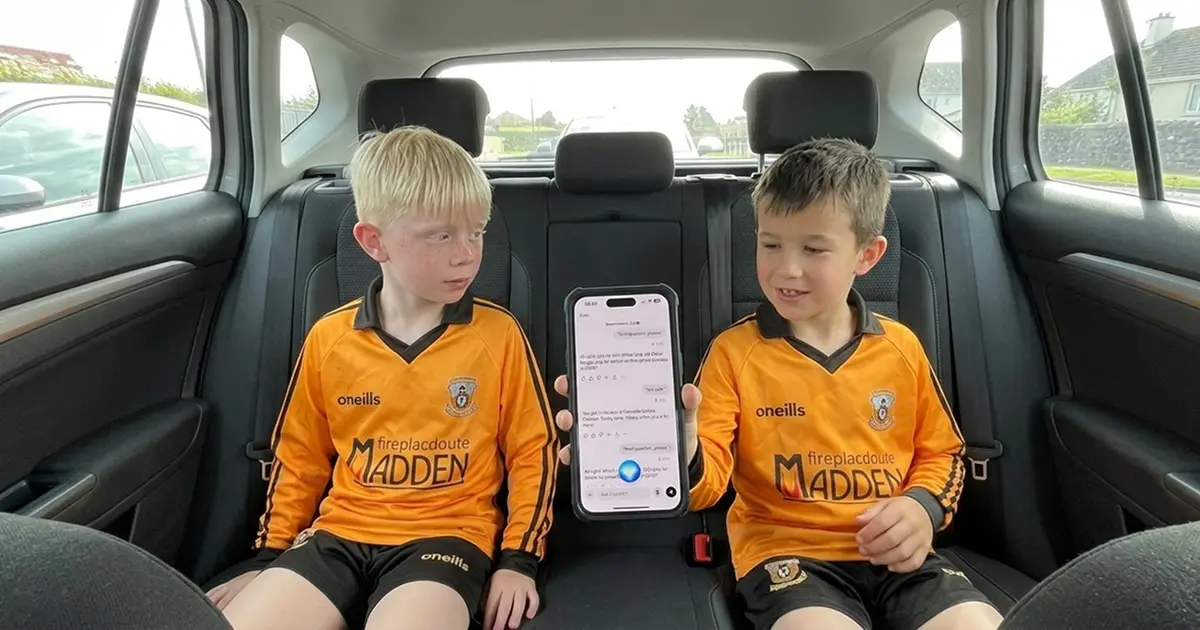
My son Mateo and his friend had a 40-minute car ride to an underage football match on Sunday. I needed something to keep two 8-year-old football fans entertained without handing them a screen to scroll.
I opened ChatGPT on my phone, switched to voice chat, and asked it to run a 20-question football quiz. Current season, Champions League and Premier League, medium to hard difficulty. No multiple choice.
The first few questions went badly. The AI confidently told us Erling Haaland scored a hat-trick against Copenhagen in March. It didn't happen. When I pushed back, it admitted the answer was "a crafted example." The boys looked at each other. "It's making stuff up."
Then we found what works. This guide covers the full setup, the mistakes to avoid, the pivot that saved the quiz, and why the AI getting things wrong turned into the best teaching moment of the day.
Quick overview
- Time: 20-40 minutes (perfect for a car journey)
- Cost: Free (ChatGPT free tier includes voice chat)
- Difficulty: Beginner
- Age range: 6-10 years
- Key learning: Stick to historical facts, not recent events. AI models don't have live data.
- What you'll create: A voice-powered quiz on any topic your kids love, run entirely hands-free while you drive
What you'll need
Tools
- ChatGPT app on your phone (free, available on iOS and Android)
- A car journey of 20+ minutes
- Phone connected to car speakers via Bluetooth or aux cable (so everyone can hear)
Your child's input
- A topic they're passionate about (football, animals, geography, movies, music)
- Willingness to shout answers at a phone
Parent skills
- None. You set up the prompt before you drive. The AI runs the quiz.
- Knowing the topic helps you catch wrong answers, but isn't required
Optional
- A second adult to manage the phone while you drive
- A notepad to keep score (or just let the AI track it)
Not sure which tool is right for your child?
Take our free 2-minute quiz and get personalized AI tool recommendations based on your child's age and interests.
Step-by-step process
Here's how we set up the quiz, where it went wrong, and the pivot that made it work. You can adapt this for any topic your kids are into.
Step 1: Set up the prompt before you start driving
Open ChatGPT and switch to voice chat (tap the headphone icon). Before putting the car in gear, give it clear instructions. Be specific about the format you want.
My prompt:
"I'm here with my son and his friend, both 8, big football fans. I want a quiz of 20 questions. No multiple choice. You ask the question, wait for an answer, then move to the next one. Medium to hard difficulty."
💡 Parent Insight: Tell the AI to "wait for an answer" before moving on. Without this instruction, it tends to give the answer away after a few seconds of silence. Even better, add "Only give the answer when I say 'what's the answer'" to your setup prompt.
Step 2: Choose your topic carefully (this is where we went wrong)
I asked for questions about the 2025-2026 Champions League and Premier League season. Results from January to March 2026.
The AI said yes. It started asking questions with complete confidence. "Which team ended Liverpool's unbeaten run at Anfield in February?" The boys shouted "Wolves!" and the AI said correct.
Then it asked about a Champions League hat-trick. The boys didn't know. The AI said it was Erling Haaland against Copenhagen. I knew that didn't sound right. I pushed back.
"Are you sure? I think it was Valverde for Real Madrid."
The AI doubled down. "I'm sure! Haaland got his hat-trick in a big win for Manchester City." I asked which match. It said Copenhagen, March, second leg of the Round of 16.
I asked it to confirm the year. 2026, not 2025. That's when it admitted: "I don't have the latest real-time match data."
The boys went quiet. Then one of them said, "So it was lying?"
Result: Three wasted questions with fabricated answers before we caught it. The AI never flagged that it was guessing.
💡 Parent Insight: AI chatbots will never tell you they're guessing. They sound equally confident whether the answer is real or fabricated. If you're using voice chat for a quiz, stick to topics where the facts are old enough to be in the AI's training data. Recent sports results, news events, and anything from the last 6-12 months are danger zones.
Step 3: Pivot to topics the AI actually knows
I changed direction. Instead of recent match results, I asked for questions about players' careers. Which clubs they played for, transfer history, career facts.
"Let's change it up. Rather than actual results from matches, let's focus on players' careers. Questions about players and the clubs they've played for."
The difference was instant. "Which three European clubs did Cristiano Ronaldo play for before returning to Manchester United in 2021?" Real question. Real answer. The boys got two out of three (forgot Real Madrid, which they found hilarious).
From that point on, every answer checked out. Fernando Torres at Liverpool and Chelsea. Thierry Henry to Barcelona. Luka Modric from Dinamo Zagreb. N'Golo Kante winning the league with Leicester.
Result: 12 solid questions with accurate answers. The boys were competitive, shouting over each other, having a great time.
💡 Parent Insight: The rule of thumb is simple. If the answer would be on Wikipedia, the AI will get it right. If the answer would only be on a live sports ticker or news site, the AI will make something up. Player careers, historical events, geography, science facts, and movie plots all work. Last weekend's results do not.
Step 4: Keep the energy going
The AI settled into a good rhythm once we found the right topic. It asked the question, waited for an answer (mostly), and gave a quick reaction before moving on.
When the boys got one wrong (Mesut Ozil played for Werder Bremen before Real Madrid, not Arsenal), the AI explained the correct answer without making them feel bad about it.
We ran out of time before we ran out of questions. Both boys wanted to keep going after we parked. That's the sign of a good activity.
What worked
Voice quiz format in the car
Everyone could hear through the car speakers. No screens needed. The driver (me) could focus on the road while the AI ran the quiz. The boys talked to each other, debated answers, and competed. It felt like a real pub quiz, not a screen activity.
Lesson: Voice AI in the car is a genuinely hands-free activity. Set it up before you leave and let it run.
Historical facts over recent events
Player career questions were 100% accurate. Transfer history, club records, career milestones. The AI knows this because it's baked into its training data. Every answer checked out.
Lesson: Ask the AI about things that happened years ago, not last week. It knows Ronaldo's career. It doesn't know last Tuesday's score.
Two kids competing together
Having two boys made it better than one. They debated, disagreed, and celebrated together. The social element turned a simple quiz into genuine entertainment.
Lesson: This works best with 2-4 kids. Solo works too, but the energy is different.
What didn't work
Asking about current season results
The AI fabricated match results with total confidence. It said Haaland scored a hat-trick that never happened. When caught, it said Phil Foden scored a late winner against Chelsea, then admitted that was "a crafted example" too. It never warned us upfront that it couldn't answer current questions.
Time wasted: About 5 minutes and 3 questions before we figured out the pattern
Lesson: AI chatbots do not have access to live sports data. They will make up plausible-sounding answers rather than say "I don't know." Never trust an AI for recent results.
💡 Parent Insight: The boys lost some trust in "the machine" after this. That's a good thing. Kids who learn early that AI can be confidently wrong are better equipped to use these tools responsibly. Don't shield them from the failure. Let them catch it.
The AI giving answers too early
Several times the AI jumped in with the correct answer before the boys had a chance to discuss. It treated a pause as "they don't know" when actually they were thinking.
Time wasted: 2-3 spoiled questions
Lesson: In your setup prompt, tell the AI to "wait at least 30 seconds before giving the answer" and "only give the answer when I say 'what's the answer.'"
Why the AI gets it wrong (and why that's useful)
AI language models like ChatGPT don't search the internet during voice chat. They generate responses based on patterns in their training data, which has a cutoff date. When you ask about something after that date, they don't say "I don't know." They construct an answer that sounds right.
This is called hallucination. The AI isn't lying on purpose. It's doing what it's trained to do: produce confident, fluent text. It has no concept of "I'm not sure about this one."
For parents, this is a useful teaching moment. My son and his friend saw firsthand that a computer can sound completely certain and still be completely wrong. "So it was lying?" is a question every kid using AI tools should be asking. The earlier they learn to question confident-sounding sources, the better.
After the quiz, we talked about it in the car. I explained that the AI doesn't know the difference between a real match result and one it made up. The boys got it straight away. They started testing it on purpose, asking questions they already knew the answers to, to see if it would get them right.
That critical thinking didn't come from a lesson plan. It came from the AI getting caught.
💡 Parent Insight: If your child can use ChatGPT but can't explain why it sometimes gets things wrong, they have usage skills but not literacy. A 20-minute car quiz where the AI fails teaches more about AI literacy than any course or worksheet. The mistake is the lesson.
Tips for your own AI car quiz
Before you start:
- Connect your phone to car speakers via Bluetooth so everyone can hear
- Set up the full prompt before you start driving. Include topic, number of questions, difficulty, and the instruction to wait for answers
- Pick topics based on established facts: player careers, country capitals, animal facts, movie plots, historical events. Avoid anything from the last 6-12 months
During the quiz:
- If the AI gives an answer too early, say "Don't give the answer until I ask for it"
- If you suspect a wrong answer, challenge it. Say "Are you sure? Can you verify that?" The AI will often backtrack
- Let the kids talk to each other. The debate is half the fun
- Ask the AI to repeat questions. Car noise makes it easy to miss things
What I'd do differently:
- Start with career/history questions from the beginning instead of wasting time on current results
- Add "Only give the answer when I say 'what's the answer'" to the initial prompt
- Try different topics for the return journey. The boys wanted a movie quiz on the way home
Common issues and solutions
Problem: The AI makes up answers about recent events
Solution: Switch to historical or factual topics immediately. Player careers, geography, science facts, movie trivia. Anything that happened more than a year ago is generally reliable.
Problem: The AI reveals the answer before kids can respond
Solution: Add this to your setup prompt: "Do not give the answer until I specifically say 'what's the answer.' Wait in silence after asking each question." If it still jumps in, interrupt and say "Wait, they're still thinking."
Problem: Voice chat doesn't pick up the kids' answers
Solution: The adult should relay the answer. "They said Wolves." This is more reliable than having kids shout from the back seat, especially with road noise.
Problem: The AI asks questions that are too easy or too hard
Solution: Tell it mid-quiz. "Make the next few harder" or "That was too difficult, bring it down a level." It adjusts in real time.
Problem: Voice chat cuts out or the AI stops responding
Solution: Close and reopen the ChatGPT app. Voice chat sessions can time out after extended pauses. Keep the conversation flowing to avoid disconnects.
Problem: Kids lose interest after a few questions
Solution: Switch topics. We moved from football to player careers, but you could go from animals to geography to movies. The variety keeps it fresh. Ask the kids what they want next.