Turn Your Football-Mad Kid Into Their Own FC26 Player Card
ON THIS PAGE
Subscribe To Get Weekly Family AI Discoveries

My 8-year-old son Mateo is obsessed with FC26. Since Santa brought him a Nintendo Switch, his screen time shifted from YouTube to playing career mode, learning every player's stats, and building his dream team.
This afternoon, I thought: what if he could see himself as an FC26 player card? Not just any player—with his own custom stats, wearing his favorite team's jersey (Arsenal), and animated like the rare cards in the game.
So I asked him to rate himself. "What's your passing accuracy, Mateo? Your dribbling? Your speed?"
He took it seriously. Really seriously. "Dad, I'm at least an 85 for speed. But maybe 70 for strength..."
Forty-five minutes later, we had a pulsing, animated player profile card of him in an Arsenal jersey with his self-assessed stats. He watched it loop five times, grinning.
"Can I show this to my friends?"
Absolutely.
Tools
- Nanobanana - AI image generator for creating the player card
- Free tokens with Higgsfield annual subscription ($60/year)
- OR pay-per-use credits
- Kling AI 2.6 - For animating the card
- Requires paid plan: 3,000 tokens/month (~$10/month)
- Alternative: Keep it static and skip animation
- Photo of your child - Clear, well-lit headshot
- Ideally facing camera, neutral background
- High resolution works best
Materials
- Your child's self-assessed player stats (see template in guide)
- Favorite football team (for jersey/colors)
- Country they want to represent
- Preferred player position
Parent Skills Required
- Basic prompt writing for AI image generation
- Patience for iterations (expect 3-5 failed attempts)
- Familiarity with FC26 player cards (helpful but not required)
Time Breakdown
- Stats brainstorm with child: 10 minutes
- Image generation (with iterations): 20-30 minutes
- Animation (with iterations): 15-20 minutes
- Total: 45-60 minutes
Step 1: The Stats Session (10 minutes)
Sit with your child and work through the FC26 attributes. Make it fun—let them justify their ratings.
FC26 Player Attributes Template:
| Attribute | Rating (0-99) | Their Justification |
|---|---|---|
| Pace/Speed | __ | |
| Shooting | __ | |
| Passing | __ | |
| Dribbling | __ | |
| Defending | __ | |
| Physical/Strength | __ |
Additional Details to Collect:
- Overall rating (average or their "dream" number)
- Preferred position (Striker, Midfielder, Defender, Goalkeeper)
- Favorite team (for jersey)
- Country to represent
- Special skill/trait (optional: "Speed Dribbler", "Clinical Finisher", etc.)
Pro Tip: Younger kids (8-10) often rate themselves higher than reality. That's the fun part. Let them dream big. Mateo gave himself 85 speed because "I'm fast at school."
Step 2: Photo Upload (2 minutes)
Upload a clear photo of your child to Nanobanana. Face clearly visible, good lighting, neutral background works best.
Safety Note: Only upload photos to tools you trust. Always read privacy policies before uploading children's photos.
Step 3: Generate the Player Card (20-30 minutes)
I created TWO different versions using two different camera angles.
Version 1: Full-Body Stadium Tunnel Shot (MAIN VERSION)
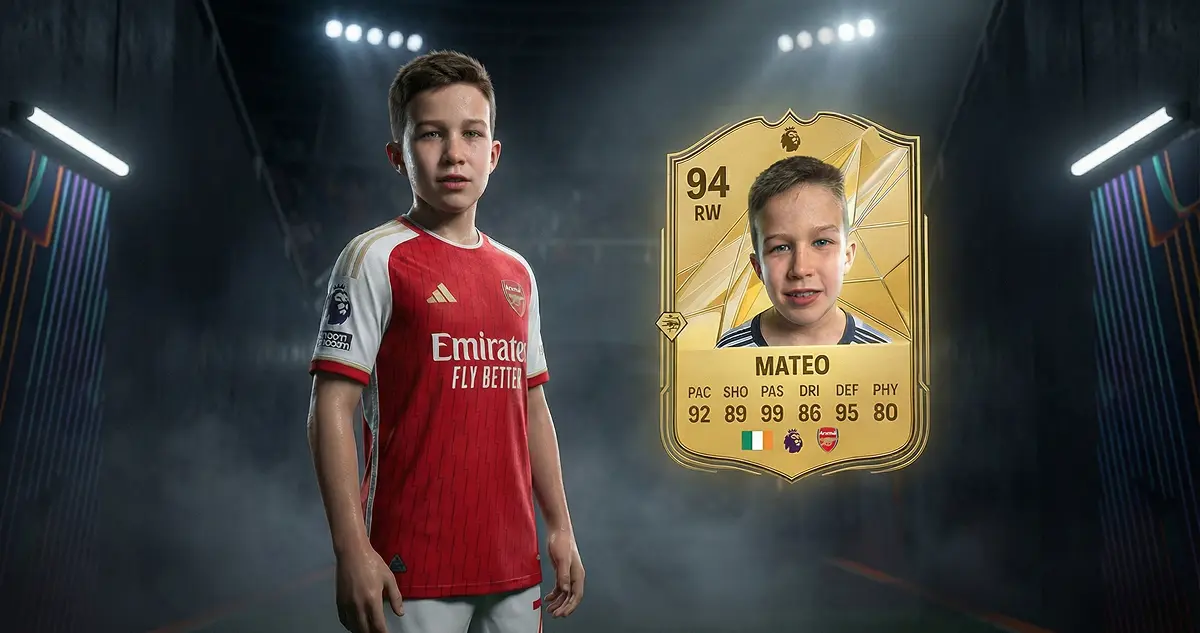
This was our favorite - the full cinematic reveal with the golden card floating next to him.
Actual Prompt Used:
Transform the attached image of a person into a full-body ultra-realistic 3D in-game character render inspired by EA SPORTS FC 26.

The character is standing confidently in a football stadium tunnel, cinematic lighting, wearing a professional football jersey [Arsenal / Ireland], modern fabric, stitched details, realistic folds and sweat micro-details.

Render the character as a next-gen EAFC 26 in-game model, full body, athletic proportions, ultra-detailed realistic skin, pores, facial micro-expressions, sharp eye reflections, realistic hair strands, accurate likeness preserved 1:1 from the attached image.

Next to the character, place a premium EAFC 26 GOLDEN PLAYER CARD, vertical orientation, floating slightly in the air.

The card features:
– Player face portrait (same person)
– Player name: Mateo Minihan
– Position: Right Wing
– Overall rating: 94
– Stats layout: PAC [92] / SHO [89] / PAS [99] / DRI [86] / DEF [95] / PHY [80]
– EAFC 26 logo branding
– Gold metallic texture, engraved edges, holographic reflections, premium Ultimate Team aesthetic

Scene style: EA SPORTS FC 26 cinematic reveal, AAA video game quality, Unreal Engine 5 look, ray-traced lighting, soft volumetric fog, dramatic rim light, stadium LED glow, shallow depth of field.

Camera: medium-wide full-body shot, slightly low angle, heroic stance, character facing camera.

Style & quality: ultra-realistic 3D render, next-gen football video game, hyper-detailed textures, 8K quality, sharp focus, realistic materials, cinematic color grading, no cartoon style.

Preserve identity exactly from the attached image. No facial changes.
Customization Tips: Replace player name, position, overall rating, stats (PAC/SHO/PAS/DRI/DEF/PHY), and jersey [Arsenal / Ireland] with your child's details.
Version 2: Hero Low-Angle Shot
Same setup but with camera positioned near ground level, looking upward, emphasizing power and presence.
What to Expect:
✅ Successful generations: Correct team jersey, stats clearly visible, clean card design, recognizable face
❌ Failed generations: Wrong jersey, name across chest, morphed stats, face doesn't match
Iterations: I generated 5 variations before getting one Mateo loved. Budget 20-30 minutes.
Step 4: Animate with Kling AI (15-20 minutes)
My Working Prompt for Kling AI 2.6:
The golden player card pulses gently with a subtle glow effect, as if it's a rare Ultimate Team pack reveal. The card stays centered and static (no rotation), with soft lighting effects that make it feel premium and valuable. Subtle shimmer on the gold borders.
Why pulsing instead of rotating: I tried rotation but text morphed horribly. Burnt 3-4 Kling credits before giving up. Simple animations (pulse, glow, zoom) work better for cards with text.
Step 5: The Reveal (5 minutes)
Show your child the final animated card. Mateo watched it loop 5 times, then asked: "Can I show this to my friends?"
Display Options:
- Save to phone camera roll and share
- Set as phone wallpaper
- Print as physical trading card (2.5" x 3.5", laminate for durability, ~$5-10 at print shop)
What Worked
✅ The Stats Self-Assessment Built Ownership
Asking Mateo to rate himself wasn't just data collection—it was identity work. He thought deeply about each attribute. This wasn't me imposing stats. It was him defining how he sees his football abilities. That made the final card his.
✅ Arsenal Jersey Created Instant Emotional Connection
The second Mateo saw himself in the Arsenal kit, his face lit up. It wasn't just "cool AI art." It was him wearing his heroes' jersey. That's the difference between a generic football card and one that feels real.
✅ Creating Two Versions Gave Him Choice
I generated both the standard angle AND the low-angle hero shot. Mateo loved having options: Standard version for sharing with friends (looks more "official"), Hero low-angle for his phone wallpaper (makes him look like a superstar).
✅ Animation Made It Feel Official
The static card was great. The animated, pulsing version felt professional—like something from the actual game. Mateo said: "It looks like when you get a rare player in a pack." That's exactly what Kling animation achieved.
✅ Quick Project, High Impact
Total time: 45 minutes. Emotional impact: He's still talking about it 3 days later. This isn't a multi-hour intensive project. It's a quick win that delivers outsized joy.
What Didn't Work
❌ Wrong Jersey Generations
What happened: 2 out of 5 Nanobanana generations put Mateo in an Argentina jersey instead of Arsenal red.
Why: The photo I uploaded to Nanobanana showed Mateo wearing an Argentina jersey. The AI sometimes defaulted back to what was in the reference photo instead of generating the Arsenal kit I requested in the prompt.
Fix: Upload photo wearing neutral shirt, be extra specific in prompt ("specifically Arsenal home kit, red with white sleeves, NOT Argentina jersey"), or include negative prompt.
❌ Name Printed Across Chest
What happened: Two generations had "MATEO" printed across his chest like a name label, not on the card.
Fix: Clarify in prompt: "Name appears only on the player card template, NOT on the jersey" or add name afterward in Canva/Photoshop.
❌ Rotation Animation Failed
What happened: Tried to rotate card 360° to show front and back. Text morphed grotesquely during rotation.
Burnt credits: 3-4 failed generations (~300-400 Kling tokens wasted).
Fix: Stick to simple animations (pulse, glow, zoom, float). Avoid rotation for anything with text/numbers.
Other Ideas to Try
🎮 Full Ultimate Team Squad
Create cards for your child + their friends = full 11-player squad. Each friend rates themselves → you generate their cards → print as a set. Use case: Birthday party activity or team gift.
⚽ "Career Mode" Evolution
Create 3 versions of the same child: Age 8 (Overall 75 rating), Age 12 (Overall 82), Age 16 (Overall 89). Show their "career progression" over time.
🏆 Tournament Winner Card
Did your child win a school tournament or score a hat-trick? Create a special "Team of the Week" style card commemorating the achievement. Add badge: "Player of the Match - May 2026"
👨👩👧👦 Family Ultimate Team
Create player cards for the whole family. Make it funny. Let everyone rate themselves. (Dog: GK - 99 reflexes)
✅ Let Kids Pick "Dream Stats" Not "Realistic Stats"
When Mateo rated himself 85 for pace, I almost corrected him. Then I thought: This is fantasy. This is how he sees himself when he imagines being a pro. Don't impose realism. Let them dream.
✅ Use Their ACTUAL Favorite Team
Don't default to Barcelona or Real Madrid because they're "popular." If your kid loves Aston Villa or Brentford, use that. The personal connection matters more than prestige.
✅ Budget for 5+ Image Generations
I got lucky with 5 attempts. You might need 8-10 to get the perfect one. With Nanobanana's free tokens (Higgsfield subscription), this is no problem.
✅ Skip Animation if You're on a Budget
The static card is already amazing. If Kling AI's subscription (~$10/month) isn't in your budget, the static image still delivers 90% of the magic. Free alternative: Use Canva's free animation feature.
✅ Save Multiple Versions
Save every good generation, not just the final one. We ended up with 3 versions Mateo liked (serious expression, smiling, action pose). He uses different ones depending on mood.
Problem: Face doesn't look like my child
Solution: Use a higher-resolution photo, ensure face is clearly lit and facing camera, try uploading 2-3 different photos, use the "face reference strength" slider to increase likeness.
Problem: Stats are illegible/blurry
Solution: Increase image resolution in settings, simplify card design, specify in prompt: "crisp, clear, legible typography", or add stats afterward in Canva/Photoshop.
Problem: Can't afford Kling AI subscription
Alternatives: Runway Gen-4 (similar pricing), Pika Art (cheaper), Canva's free animation (basic zoom/fade), or skip animation entirely—static card still works.
Problem: Child wants to change stats after seeing card
Solution: Regenerate with updated stats in the prompt. Since Nanobanana already has their face reference, new generations should be faster.