I Turned My Son's Daydream Into a 15-Second AI Animation
ON THIS PAGE
Subscribe To Get Weekly Family AI Discoveries

Every kid has a daydream they replay in their head. Scoring the winning goal. Standing on an Olympic podium. Saving the world from aliens. This week I tried to put my 8-year-old inside one of his.
"He drives forward, plays it wide, ball comes back into the box, MATEO… HE'S DONE IT…"
I can hear it from the kitchen. Foam ball, hallway, no opponent. My 8-year-old has been playing imaginary matches since he was four, narrating both teams in his under-his-breath football voice. School breaktime, after school in the garden, evenings against the wall. He wants to be a professional footballer when he grows up.
I wanted to put him inside the version of the match that lives in his head. A 15-second animated short where he scores the winning goal in front of a packed stadium, then wakes up in his bedroom and realises it was all a daydream.
The whole thing took 20 minutes. ChatGPT Images 2.0 generated a 10-frame storyboard from a photo of Mateo. Seedance 2.0, accessed through Higgsfield, turned that storyboard into a cinematic video. Total credit spend: about €4.50.
When I played the result for Mateo, he ran to put on his Arsenal kit, threw his arms in the air to match the celebration shot frame-for-frame, then asked me to play it again. He watched it back the rest of the evening.
This guide is the exact workflow, with the prompts I used, the failures I hit, and the cost-per-clip breakdown.
Quick overview
- Time: 20-30 min for your first project
- Cost: ~€4.50 per 15-second video at Higgsfield's annual rate (€15/month for 600 credits)
- Difficulty: Intermediate (3-step pipeline, expect 1-2 retries)
- Age range: 8-12 yrs (parent-led for under 8)
- Key learning: Build a 10-frame storyboard first, then feed it to the video model. Skip the storyboard, and the video model hallucinates the composition.
- What you'll create: A 15-second animated short film starring your child living out their daydream (works for any sport, hobby, or scenario they keep replaying)
What you'll need
Tools:
- Higgsfield account (€15/month for 600 credits on the annual plan, ~€0.025/credit)
- A photo of your child (front-facing, head-and-shoulders, good lighting)
- 20 minutes uninterrupted
- YouTube account if you want to share the final video
Your child's input:
- Their favourite topic, sport, or scenario (e.g. football team and stadium, animal habitat, fantasy world, dance routine)
- A specific detail that personalises the scene (a shirt number, a costume colour, a pet's name)
- Permission to use their photo (talk to them about it)
Parent skills:
- Comfort copy-pasting prompts and tweaking 1-2 lines
- Patience for 1-2 storyboard regenerations
Optional:
- A Dreamina subscription if you only want Seedance access ($18-$84/month, often cheaper per clip than Higgsfield)
- A second photo of your child from behind (used as a back-view reference)
Not sure which tool is right for your child?
Take our free 2-minute quiz and get personalized AI tool recommendations based on your child's age and interests.
Step-by-step process
Step 1: Turn a photo of your child into a 3D Pixar-style character
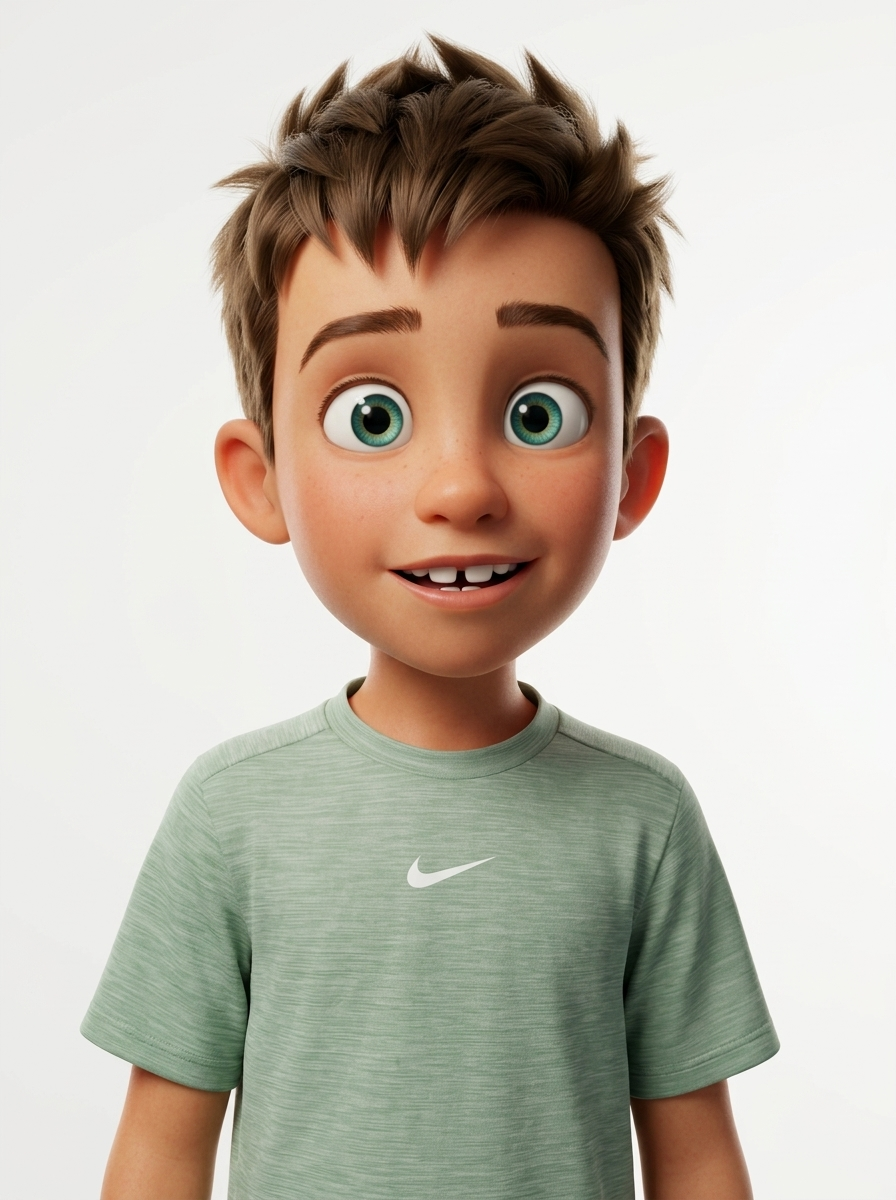
Upload a clean head-and-shoulders photo to ChatGPT Images 2.0 inside Higgsfield. Prompt for a Pixar-style 3D character version on a white studio background.
My prompt:
"Convert this photo into a high-quality 3D animated character in Pixar style. Expressive face, soft realistic lighting, clean white studio background. Keep facial features and hair colour faithful to the photo."
Result: Took 3 generations to get one I liked. The first looked too cartoonish. The second got the proportions wrong. The third matched what I wanted.
💡 Parent Insight: Generate at least three versions and pick the strongest. The model gives noticeably different output runs even on the same prompt.
Step 2: Generate the football kit version (front and back)
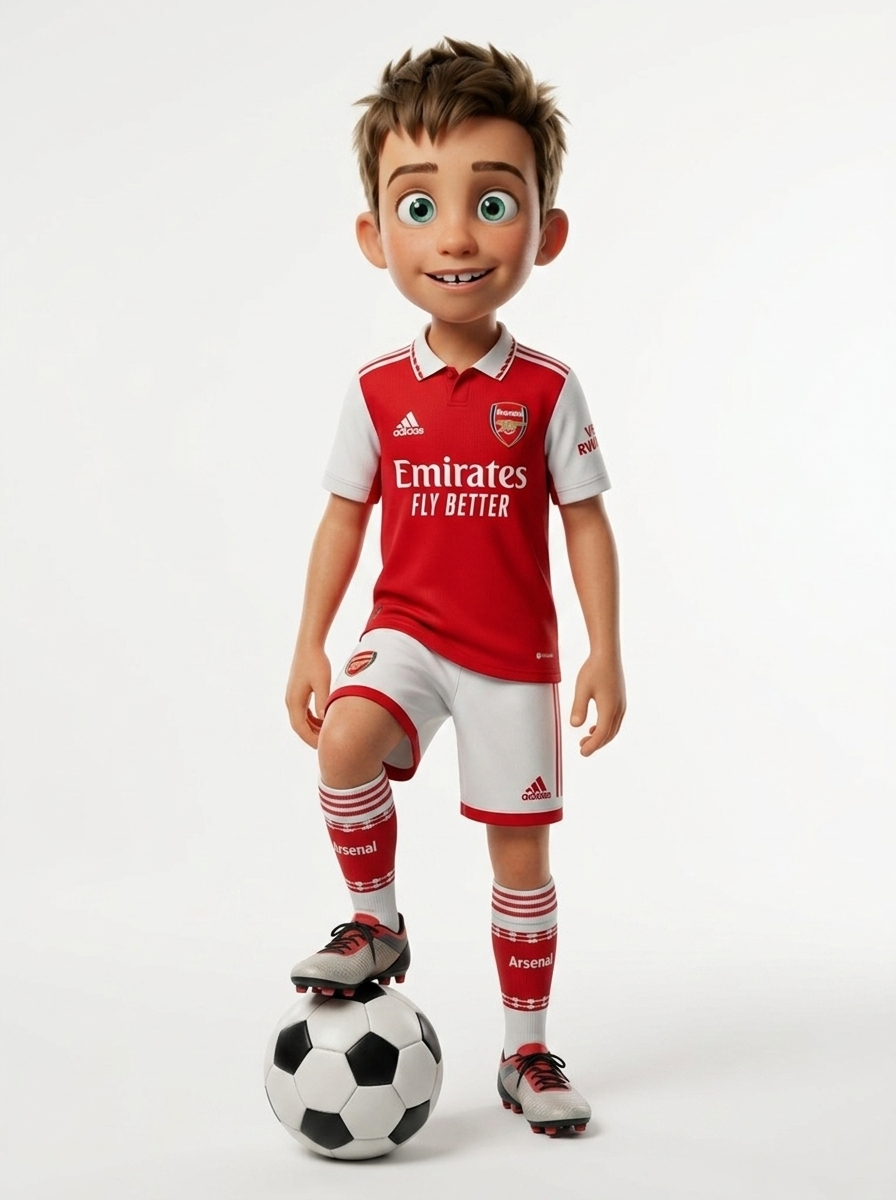
Take the chosen character, then prompt for two new images: one in an Arsenal kit facing forward, one in the same kit from behind. The back view matters because the storyboard prompt needs both perspectives.
My prompt for the front view:
"Same character, now wearing a full Arsenal home football kit (red and white striped shirt, white shorts, red socks). Standing on a green football pitch, confident pose, white studio lighting."
For the back view, I changed "confident pose" to:
"Standing facing away from camera, looking up at the stadium lights. Show full back of jersey."
Result: Two clean reference images that I'd use in the next step as @image1 (front) and @image2 (back).
Step 3: ChatGPT Images 2.0 vs Nano Banana 2 (which won)
I ran the same character prompts through Nano Banana 2 for comparison. Nano Banana 2 produced lower-quality faces with inconsistent proportions. The character looked off in a way that's hard to describe but obvious when you compare side-by-side.
ChatGPT Images 2.0 nailed the Pixar look on the third try. Worth the extra credits (~7 per generation versus ~1.5 for Nano Banana 2).
If you want the full breakdown of what ChatGPT Images 2.0 does well, see our 6 weekend activities guide which has a downloadable PDF.
Step 4: Build the 10-frame storyboard
This is the most important step. The storyboard tells the video model your camera language: where to push in, where to cut, where to slow down. Skip it and the video drifts.
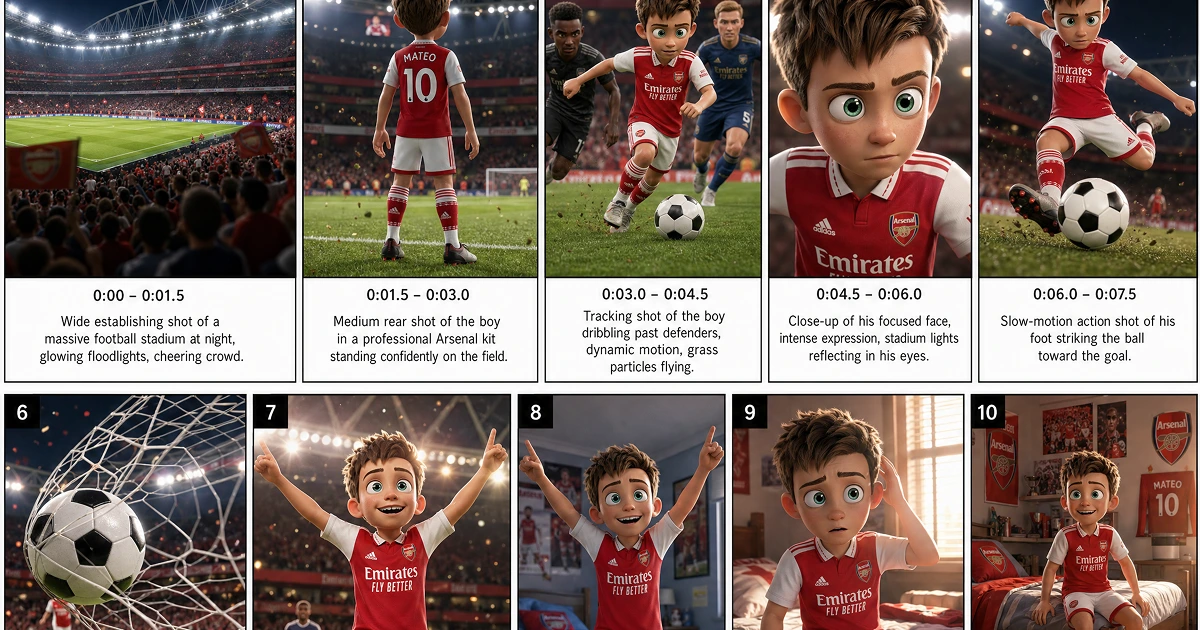
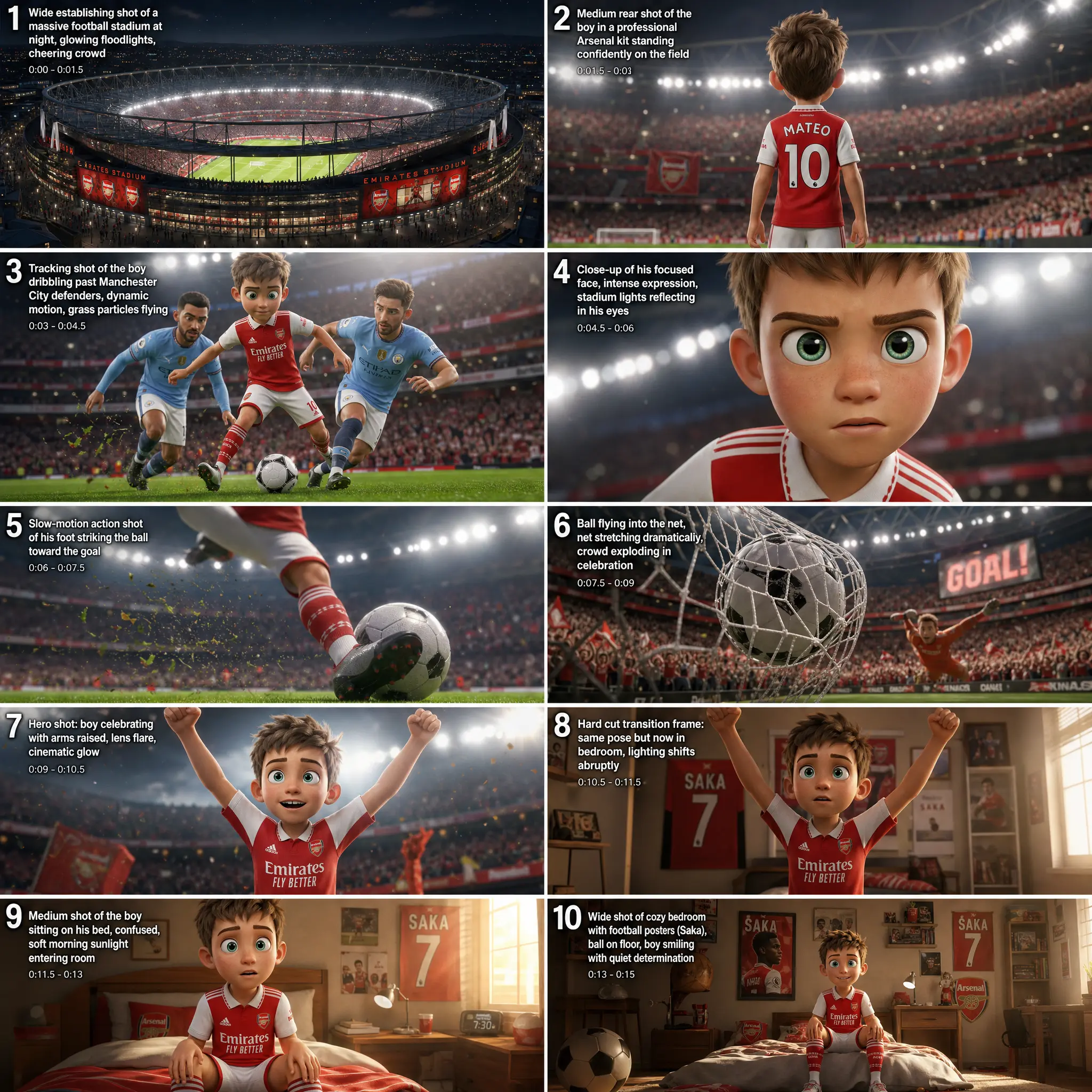
I used a single ChatGPT Images 2.0 prompt to generate a 2x5 grid of 10 frames. Both reference images were attached.
My exact prompt:
"Create a 2x5 storyboard grid (10 frames) for a 15-second stylized 3D animated short film. Style: high-quality 3D animation, cinematic composition, soft depth of field, expressive character design, realistic lighting, subtle motion blur. Theme: a young boy in @image1 (front) and @image2 (back) dreams he is a world-famous football star scoring a winning goal for Arsenal at the Emirates stadium which is packed, but wakes up in his bedroom and realises it was just a dream. Storyboard frames (left to right, top to bottom): 1. Wide establishing shot of a massive football stadium at night, glowing floodlights, cheering crowd. 2. Medium rear shot of the boy in a professional Arsenal kit standing confidently on the field. 3. Tracking shot of the boy dribbling past defenders, dynamic motion, grass particles flying. 4. Close-up of his focused face, intense expression, stadium lights reflecting in his eyes. 5. Slow-motion action shot of his foot striking the ball toward the goal. 6. Ball flying into the net, net stretching dramatically, crowd exploding in celebration. 7. Hero shot: boy celebrating with arms raised, lens flare, cinematic glow. 8. Hard cut transition frame: same pose but now in bedroom, lighting shifts abruptly. 9. Medium shot of the boy sitting on his bed, confused, soft morning sunlight entering room. 10. Wide shot of cosy bedroom with football posters, ball on floor, boy smiling with quiet determination."
Result: Generated 3 versions. Picked v3. v1 had inconsistent character proportions across frames. v2 nailed the football scenes but the bedroom looked off. v3 was clean throughout.
Step 5: First Seedance attempt blocked by eligibility check
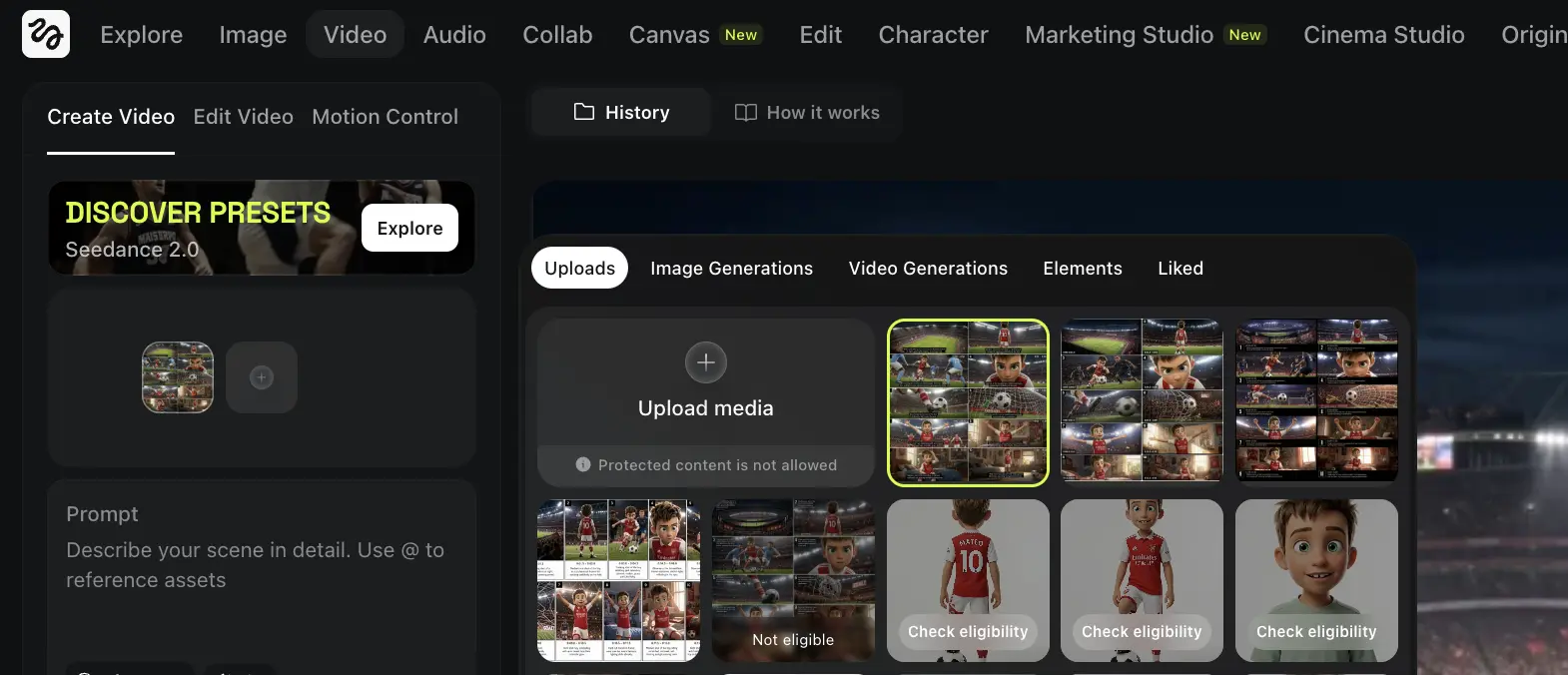
I uploaded v3 to Seedance 2.0 inside Higgsfield, pasted my video prompt (below), and hit "Check eligibility" which returned a fail.
The reason: I'd asked the storyboard to include a poster of "Saka" on the bedroom wall (Bukayo Saka, Arsenal's number 7). Higgsfield's eligibility filter blocks images that reference real public figures by name. The poster text "SAK" was enough to flag it.
Solution: Regenerated the storyboard with generic "football posters" instead of named players. Eligibility check passed on the next attempt.
💡 Parent Insight: The eligibility filter is doing useful work. It's protecting against deepfake-adjacent content that uses real footballers' names and likenesses. Keep posters, jerseys, and signs generic.
Step 6: Seedance Fast vs Seedance 2.0 (the credit decision)
Seedance Fast: 21 credits for a 15-second clip. ~€0.53. Seedance 2.0 Normal: 135 credits for a 15-second clip (currently discounted from 180). ~€3.38.
I tried Fast first to save credits. The output was disappointing on the action shots. The dribble was visual mush. The kick frame had blurry feet. The bedroom transition felt rushed.
Switched to Seedance 2.0 Normal. Action shots clean. The match-cut from the celebration pose into the bedroom landed seamlessly: same arms-raised pose, lighting shift from stadium spotlights to morning sunlight, no jarring jump.
My exact video prompt:
"Use the provided storyboard image as the primary visual reference for composition, framing, and scene progression. Generate a 15-second stylised 3D animated cinematic video that follows the exact sequence and visual storytelling of the storyboard. Style: High-quality 3D animation, cinematic realism, expressive character design, soft depth of field, realistic physics, subtle motion blur, dramatic lighting contrast. Theme: A young boy dreams he is a world-famous football player scoring a winning goal in a packed stadium, but wakes up in his bedroom and realises it was just a dream. Execution: Match all camera angles, framing, and transitions from the storyboard image. Maintain consistent character design between dream and real-world scenes. Smooth cinematic camera motion (tracking shots, slow push-ins, slight rotations). Slow motion during key action moments (dribble, kick, goal). Realistic environmental effects: grass particles, stadium lights, crowd motion. Scene flow (15s timing): 0-5s stadium sequence (wide establishing, dribble, close-up). 5-9s goal moment (kick, ball hits net, crowd erupts). 9-11s celebration hero shot (lens flare, slow-motion). 11-13s hard cut transition (stadium to bedroom, same pose match-cut). 13-15s bedroom reveal (soft morning light, calm mood, subtle smile). Lighting: Dream uses high-contrast stadium lights, cool tones, bright highlights. Reality uses warm, soft natural sunlight, grounded calm atmosphere. Mood: Start epic and high-energy, then shift into calm, intimate, slightly emotional ending."
Result: Render finished in about 90 seconds. The match-cut transition was the standout moment.
Step 7: Show your child
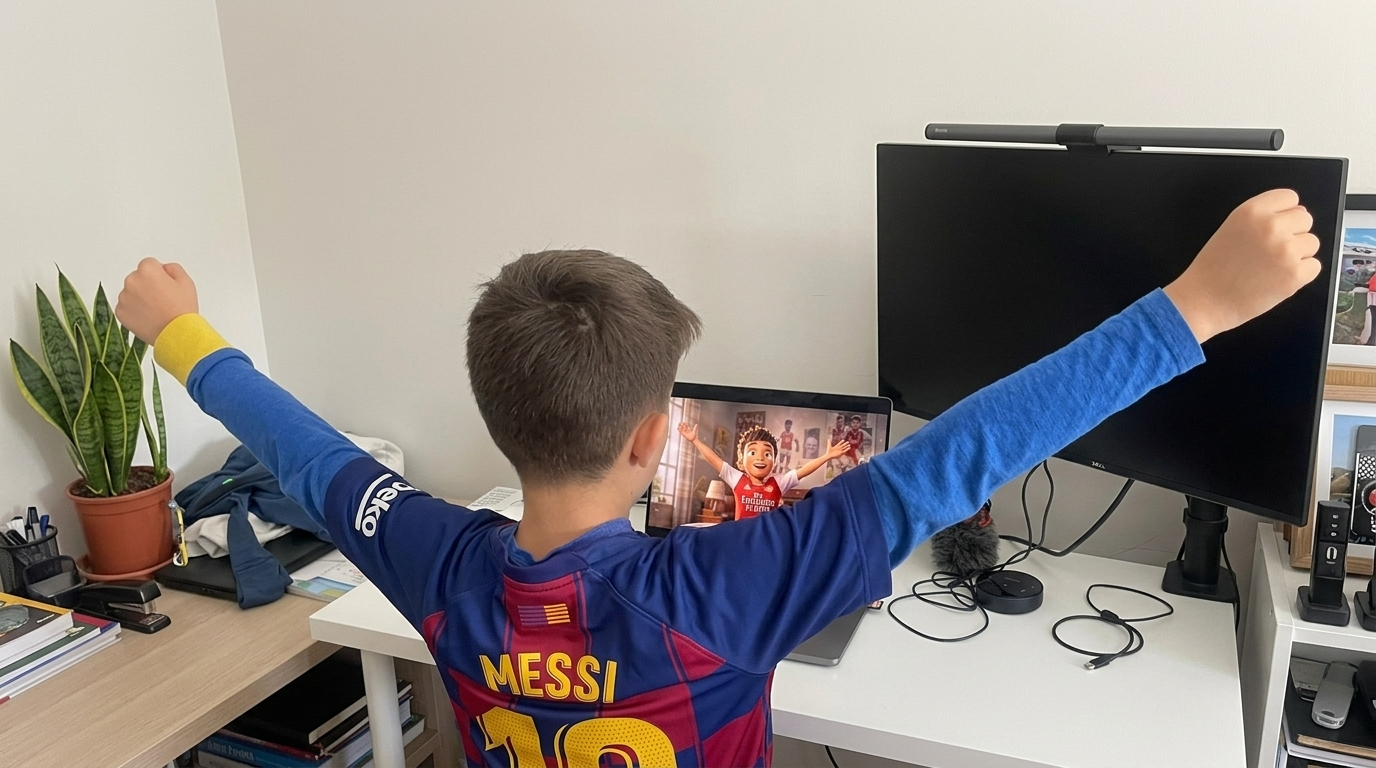
I called Mateo over and pressed play. He watched the full 15 seconds without speaking. Then he ran to his bedroom, came back wearing his Arsenal kit, threw both arms in the air to match the hero shot, and asked me to play it again. He watched it on loop the rest of the evening.
What worked
The two-step pipeline (storyboard then video)
Building the storyboard first gave the video model strong visual constraints. Without it, Seedance would have improvised the composition, and the match-cut transition would not have landed.
Lesson: Treat the storyboard as the most important step. It is the camera language for the video model.
Two character reference images (front and back)
Generating both front-facing and back-facing reference images and tagging them as @image1 and @image2 in the storyboard prompt kept the character looking consistent across all 10 frames.
Lesson: One reference image is not enough for a multi-frame storyboard with mixed perspectives. Generate at least two angles upfront.
The match-cut transition
The single most effective storytelling decision: same arms-raised pose in the celebration frame and the bedroom frame, with abrupt lighting shift. Tells the dream/wakeup story in one cut.
Lesson: Match-cuts are dirt cheap to specify in a prompt and pay off enormously in the final render.
What didn't work
Saka poster eligibility block
First storyboard included a poster of "Saka" in the bedroom. Higgsfield's eligibility check rejected it before video generation could start.
Time wasted: ~3 minutes (regenerating the storyboard with generic posters).
Lesson: Strip any text on signs, jerseys, or posters that references real public figures by name. Use generic alternatives like "football posters" or fictional names like "LEGEND 10".
Seedance Fast on action shots
First video render used Seedance Fast to save credits. Action sequences came out blurry. The match-cut transition felt rushed.
Time wasted: ~5 minutes plus 21 credits (refunded after escalation, but you cannot rely on this).
Lesson: Use Seedance 2.0 Normal mode for any sequence with motion. Reserve Fast for static-shot drafts.
Nano Banana 2 character generation
Tried Nano Banana 2 for the initial character at the same time as ChatGPT Images 2.0. Faces looked off, proportions inconsistent.
Lesson: ChatGPT Images 2.0 is the stronger character generator for kid-likeness work right now. Nano Banana 2 is fast and cheap, but the quality gap on faces is real.
Why this workflow works
The reason video models like Seedance need a storyboard reference is that they are still weak at long-horizon scene composition from text alone. Give them a strong visual structure and they execute beautifully. Give them only a paragraph of text and they invent the camera angles, often badly.
The Pixar-style 3D character look is also a deliberate choice. Photorealistic AI rendering of children sits in an uncomfortable uncanny valley, plus it sits closer to deepfake territory ethically. Stylised 3D animation is clearly artistic, clearly not real, and your child can see themselves as the hero without any of the privacy concerns that come with photorealistic faces.
This same pipeline works for any "dream sequence" your child describes. Astronaut on Mars. Pop star on a stadium tour. Olympic gymnast sticking the landing. The 10-frame structure (setup, action peaks, match-cut, reality) ports directly.
Final verdict
Seedance 2.0 Normal plus ChatGPT Images 2.0 storyboards is the strongest two-step kid-animation workflow I have tested this year.
Mateo asked me to make one for the World Cup next.
The 15-second clip limit constrains storytelling. Anything longer needs multiple renders stitched together, which compounds the credit cost. The eligibility check occasionally flags benign images and requires a regeneration.
Related projects worth a look: the Seedance 2.0 unicorn animation used the same Seedance 2.0 model on a 6-year-old's pencil drawing. Turn your child into their footballing hero is a related still-image football project. Design a football kit with AI is the simpler image-only football project for younger kids who are not ready for video yet.
Getting the most out of this workflow
Before you start:
- Have a clean front-facing photo of your child ready, head and shoulders, no hat, even lighting
- Decide on the dream scenario and the wakeup setting before opening Higgsfield
- Have your child's actual age and team preferences confirmed (the prompt needs them)
During the process:
- Save every good intermediate generation. You will need them as references in later steps.
- Generate three versions at every stage and pick the strongest. The variance run-to-run is real.
- Skip Seedance Fast entirely. The credit savings are not worth the redo.
What I'd do differently:
- Go straight to Seedance 2.0 Normal mode (135 credits) instead of attempting Fast first
- Generate the back-view character image upfront, not as an afterthought halfway through
Platform comparison
Higgsfield (~€15/month for 600 credits, annual plan)
- Pros: Bundle of ChatGPT Images 2.0, Nano Banana 2, Seedance 2.0, and other models in one subscription
- Cons: Eligibility checks can block creative prompts, per-credit cost slightly higher than direct access
- Best for: Parents who want one subscription across image and video work. Read the full review at our Higgsfield AI review.
Dreamina ($18-$84/month)
- Pros: Direct Seedance 2.0 Pro access, often cheaper per clip (~$1.91-$4.60 per 10-second 720p clip on the largest credit bundle)
- Cons: Seedance-only on the video side, no bundled image models
- Best for: Parents who already have ChatGPT Images access elsewhere and only need Seedance video
The deciding factor for our family was the bundle. We use ChatGPT Images 2.0, Nano Banana 2, and Seedance 2.0 across multiple projects, and Higgsfield's blended cost works out lower than running three subscriptions.
Common issues and solutions
Problem: Image fails the Higgsfield eligibility check before video generation
Solution: Strip any text on signs, posters, or jerseys that references real public figures by name. Regenerate the storyboard with generic alternatives ("football posters" instead of "Saka poster"). The check is on real-name and real-likeness, not on the broader scene.
Problem: Character looks different across storyboard frames
Solution: Provide at least two reference images (front and back) and tag them as @image1 and @image2 in the prompt. One reference image is not enough when the storyboard has mixed camera angles.
Problem: Action sequences look blurry or unconvincing
Solution: Use Seedance 2.0 Normal mode (135 credits / 15s), not Seedance Fast (21 credits / 15s). The credit difference is worth it for any clip with motion.
Problem: Storyboard transitions feel disconnected in the final video
Solution: Add an explicit "hard cut transition frame: same pose but new setting" frame to the storyboard. Specifying the match-cut in the storyboard tells Seedance to render a true pose-match transition.
Problem: ChatGPT Images 2.0 output looks inconsistent or off-style
Solution: Re-prompt with more specific style direction ("Pixar-style 3D character, soft depth of field, expressive face, realistic lighting"). Generate three versions and pick the strongest.
Problem: Final video clips at 12 seconds instead of 15
Solution: Be explicit about scene timing in the prompt ("0-5s stadium, 5-9s goal, 9-11s celebration, 11-13s match cut, 13-15s bedroom"). Without timings, Seedance compresses the narrative.